Why Do Your Canva Designs Look Like Everyone Else’s?
You’re using professional templates. You’re following design trends. But your marketing content still gets lost in the scroll.
Here’s the truth: There’s a massive gap between using Canva and mastering Canva for marketing results.
Canva templates are brilliant… until everyone else starts using them too.
- You spend 30 minutes customizing a template, but it still looks generic
- Your competitor posted the exact same layout last week
- People scroll right past your “professionally designed” content
- You know Canva has powerful features, but you’re not sure how to use them strategically
The result? Your marketing looks professional, but it doesn’t stop the scroll. It doesn’t capture attention. It doesn’t convert.
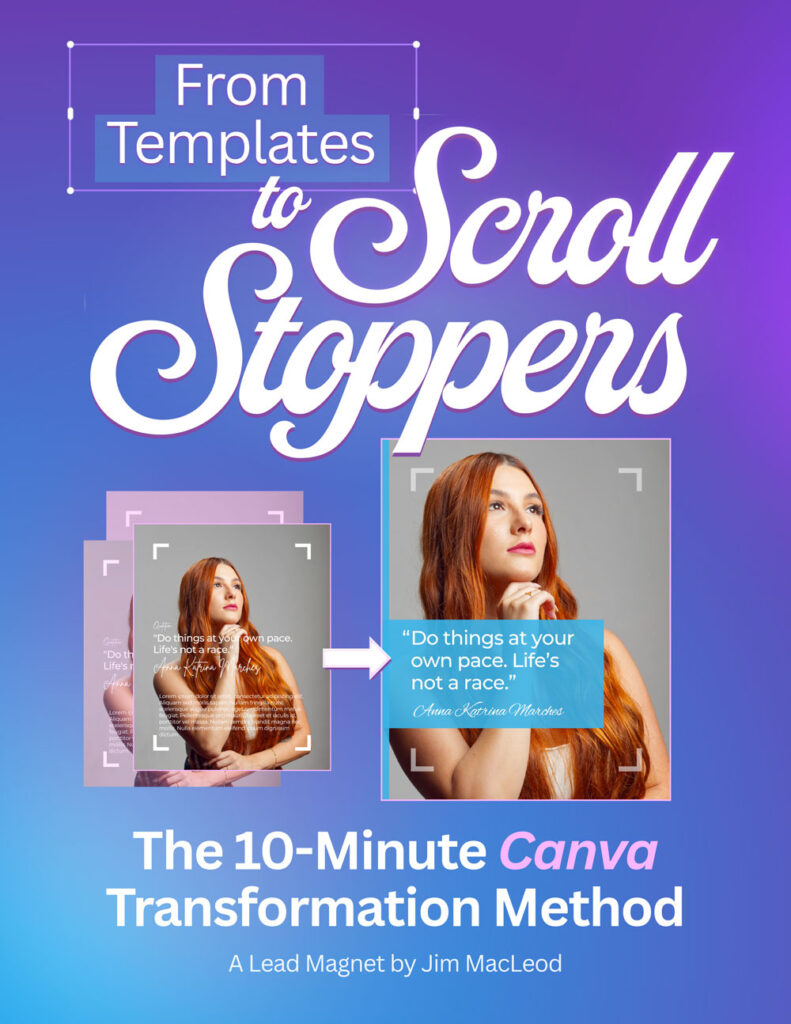
Introducing: The 10-Minute Transformation Method
What if you could take any Canva template and transform it into a scroll-stopping, conversion-driving marketing asset in just 10 minutes?
That’s exactly what this free guide teaches you.
🎯
Strategic Customization
Learn how to apply your brand beyond simple color swaps. Make design decisions that drive marketing results.
🔥
Hierarchy Makeover
Master the art of guiding your viewer’s eye exactly where you want it to go.
High contrast = high attention.
✨
Finishing Touches
Polish the details that separate amateur designs from professional marketing assets. Optimized and conversion-ready.
What You’ll Learn in This Free Guide
- The 3-step framework to transform any template in 10 minutes or less
- Before & after examples showing real transformations
- Strategic Brand Kit application that goes beyond color swapping
- Professional finishing touches that separate amateur from pro designs
- The “hierarchy makeover” technique that stops the scroll
- Mobile optimization techniques to ensure your designs work everywhere
- Printable transformation checklist you can keep at your desk
- Real-world examples: Instagram, LinkedIn, Facebook Ads, Email Headers, and more
BONUS: Get early access to Master Canva for Marketing (the complete book) when you download this guide.
What Marketers Are Saying
about Jim’s first book, The Visual Marketer.
“The book absolutely improved my competitive advantage as a marketer”
— Bob N., Tech Marketing Veteran
“A Must-Read for the Modern Marketer Navigating a Visual-First World”
— Bruce S., Speaker, Author, Consultant
“Excellent discussion of what’s needed for effective marketing!”
— Gia M., Sr. Marketing Manager
Who Created This?
Jim MacLeod
Jim bridges the gap between professional design and practical marketing. With years of experience in both Adobe-focused design teams and Canva-powered marketing campaigns, he knows what separates content that looks good from content that converts.
As the founder of Beyond Templates, Jim helps marketers master Canva to create visuals that actually drive business results‚ not just pretty pictures.
Jim is currently writing Master Canva for Marketing, the definitive guide to using Canva strategically for marketing success. His previous book, The Visual Marketer, was a #1 bestseller in the design category on Amazon.
Get Your Free Guide
Enter your details below and get instant access.
Your privacy matters. Unsubscribe anytime. No spam, ever.
Common Questions
Is this guide really free?
Yes! Completely free. No credit card required. Later on, you’ll also get early access to Master Canva for Marketing when it launches.
Do I need Canva Pro to use these techniques?
The core method works with Canva Free. A few techniques (like Background Remover) use Pro features, with free alternatives provided where possible.
How long will it take to see results?
You can transform your first template in 10 minutes. Most people report better engagement within the first week of applying these principles.
Is this for beginners or advanced users?
Both! If you’re new to Canva, you’ll learn strategic frameworks. If you’re experienced, you’ll discover techniques that elevate your work from good to great.Both! If you’re new to Canva, you’ll learn strategic frameworks. If you’re experienced, you’ll discover techniques that elevate your work from good to great.
What format is the guide?
A beautiful, 12-page PDF with before/after examples, step-by-step instructions, and a printable checklist. Designed in Canva (and Affinity), naturally.
Ready to Get Started?
Join hundreds of marketers creating professional designs with confidence.